In this guide
A salary range, an agreement, a benefits guide and a written offer answer different questions. Compare them by role, employee category and effective period.
Start with the question a number can answer
A compensation number is useful only when its label travels with it. An annual range might describe a classification, a hiring estimate, a budget assumption or an occupational statistic. Those are not interchangeable. Before comparing two numbers, write down what each measures, which workers it covers, where it applies and when it became effective. If any field is missing, the comparison is incomplete.
This is a reading framework, not a calculation of anyone’s pay, pension, tax position or benefit entitlement. The goal is to help a reader organize public evidence and prepare a precise question for the appropriate official source. Do not enter your pay statement, employee identifier, retirement balance or family information into this publication. The comparison tool uses only public categories.
A hypothetical reader finds a national occupation median and a Phoenix classification range. Subtracting one from the other would produce a number but not a reliable assessment of the offer. One summarizes a national occupation; the other describes a local classification structure. A specific written offer is a third object. Keeping all three visible avoids an attractive but unsupported conclusion.
The Phoenix document stack
Phoenix’s Total Compensation page organizes public information around the pay ordinance, salary plans, and compensation-and-benefit documents. When checked on October 1, 2026, the index listed Pay Ordinance S-53059 as effective July 6, 2026, alongside 2026–28 agreements and 2026–2028 benefit-category guides. That is a dated observation of the index, not a statement that every later amendment has been captured here.
Use the index to locate the current document instead of starting from an old saved PDF. The filename, cover period, effective date and amendment notes can all matter. A search engine may continue showing a 2024–26 document after a new period begins. Its continued availability can make it useful historically without making it the correct source for a current decision.
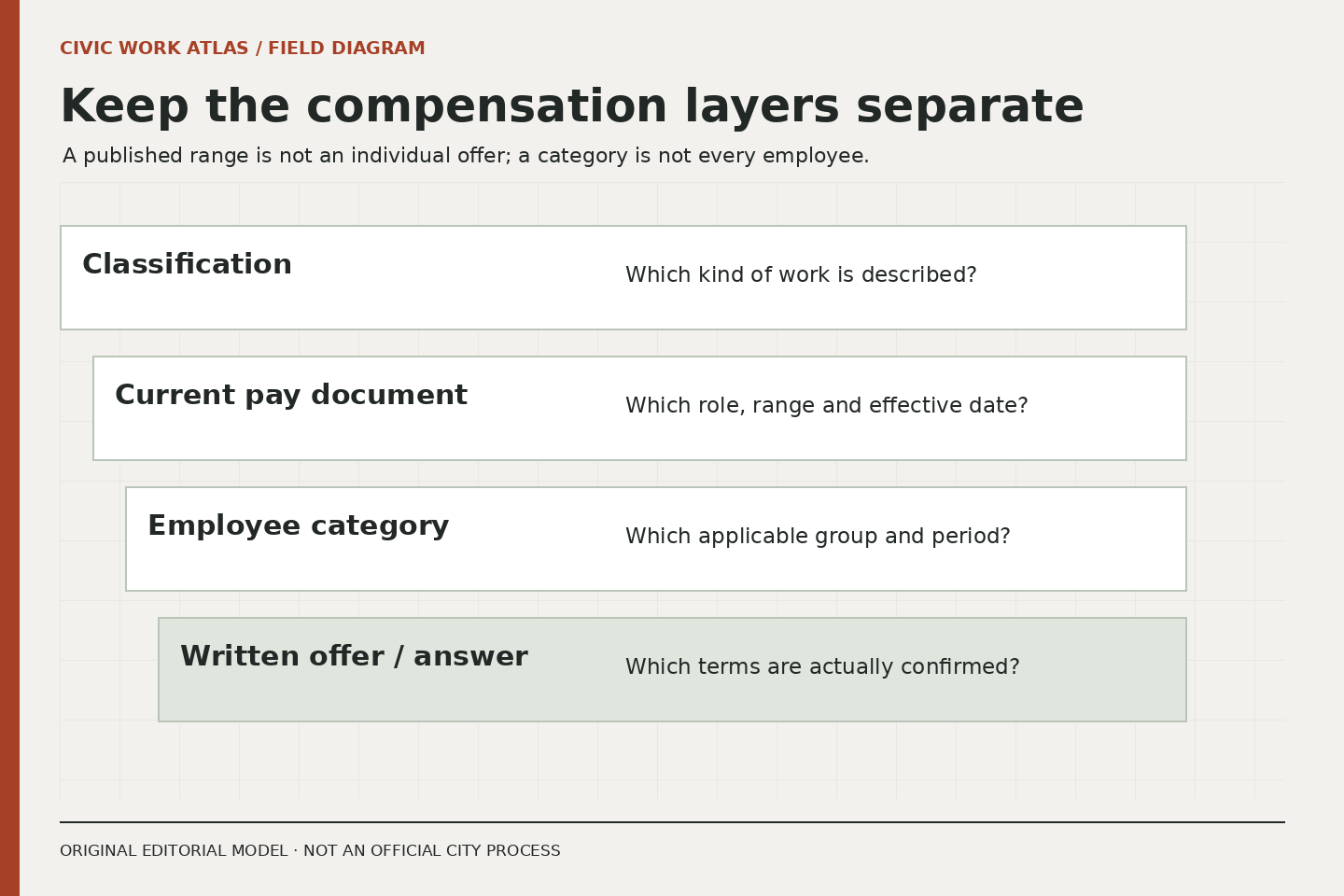
Create a source stack with four rows: classification reference, current pay document, applicable employee-category document and actual offer or individual explanation. Add a fifth row only when useful, such as a plan-year benefits guide. Record why each row is present. A folder full of documents is less useful than a small set with clearly assigned questions.
Match the unit before reading the benefit
Employee categories are substantive scope information. A provision in a document for one bargaining unit or professional group should not become a statement about every City worker. Even similar wording across two guides does not justify dropping their categories, dates or exceptions. First establish which document is relevant to the role you are researching; then examine the provision.
Suppose two hypothetical announcements point to different benefit categories. A reader notices a leave heading in both. The correct next step is to compare the applicable text and conditions, not to assume the headings promise identical arrangements. The guide might also refer to another governing document. Record that dependency so the shorter summary is not treated as the entire rule.
Do not determine your own category solely from a job’s everyday description. “Office work,” for example, is a broad description of activity, not proof of a particular unit code. If the announcement or offer does not make the category clear, the unresolved question is narrowly framed: which compensation-and-benefit category applies to this exact position? The answer should come from the responsible employer channel.
Separate a pay range from an offer
A classification’s full range can help explain structure while still leaving a substantial question about entry placement. Preserve any separate hiring-range label in a vacancy. Do not present the top of the full range as the likely starting salary or the minimum as a guaranteed offer. An offer depends on the actual recruitment and the employer’s written determination.
In an original worksheet, use three adjacent boxes: published classification range, published hiring information and confirmed individual offer. Leave an unknown box empty with a question label. Do not fill it with the midpoint simply because a spreadsheet needs a number. A range midpoint is an arithmetic result, not evidence that the employer will offer it.
The same caution applies to hourly and annual figures. A conversion assumes a paid-hours basis and treatment of time that may not match the position. If the source provides both values, preserve the source labels. If it provides only one, avoid an apparently precise conversion until the required assumptions are known. Scheduled hours and paid hours need not be interchangeable in every context.
Treat benefits as conditions, not a single bonus number
Benefits are often summarized as a list of attractive categories. The decision-relevant work is to identify the applicable plan year, enrollment conditions, employee contribution information and relevant official documents. A general prospective-employee page can point toward those questions. It cannot answer them for every person, dependent, appointment type or date.
The active-employee resource page checked for this publication listed both 2026 and 2027 materials. That illustrates why “the latest PDF” is not enough. A future plan-year guide can be available while a reader is still asking a current-year question. Label the year beside every note, including a note about an upcoming enrollment decision. Availability on the website does not erase its effective period.
Avoid converting every benefit into cash and adding the result to salary. Some benefits depend on use, elections, eligibility or future events. A simple comparison can instead mark each item as confirmed applicable, conditional, unresolved or irrelevant to the current decision. This method preserves uncertainty without pretending to value a personal choice that the publication cannot assess.
Make the comparison auditable
For each important statement, record the page or document title, relevant section, period and date checked. Distinguish direct source text from your interpretation. If a shorter public summary and a detailed document appear inconsistent, keep both references and ask about the specific difference. Do not silently choose the more favorable statement or publish a private entitlement conclusion.
A useful question might be: “This announcement links to category X, while the document I found covers period Y. Which current guide should I use for this position?” It identifies the evidence problem without sending private records to the wrong place. If an individual case later requires records, follow the verified official channel’s instructions rather than attaching them to a general inquiry here.
End with a decision note that names what is known and what would change the comparison. For example: “The worksite and stated hiring information are documented; the applicable benefit category still needs confirmation.” A careful unresolved field is more useful than a confident invented total. Compare an Offer without Filling the Gaps Yourself turns this source stack into a review of actual offer terms, and Read the Year, Audience and Conditions of a Benefits Document focuses on reading the year and audience of benefits materials.
Use the Comparison Desk to compare two role or resource questions.
Related reading: Read the Year, Audience and Conditions of a Benefits Document, Compare an Offer without Filling the Gaps Yourself, What a Classification Tells You, and What a Vacancy Adds.