In this guide
A benefits page can contain current and upcoming materials together. Identify the document’s intended audience and effective period before using it.
The newest link may concern a future period
Public benefits pages often serve several time horizons at once. A guide for an upcoming plan year can be published before that year begins, while current-year documents remain relevant to existing coverage. When checked on October 1, 2026, Phoenix’s active-employee benefits page included both 2026 resources and a 2027 annual-enrollment section.
That observation does not tell a reader which personal choice to make. It demonstrates a reading problem: the date you open a page is not the same as the period governed by every document on it. Put the plan year beside the title before making notes. Avoid labeling a file simply “latest benefits.”
Identify the audience on the document itself
Look for whether the material addresses active employees, retirees, prospective employees or another group. Then identify any narrower category or appointment conditions that the document states. A broad heading such as “employees” should not erase qualifications in the actual text.
A hypothetical reader compares an active-employee guide with a retiree notice because both mention medical coverage. Their first task is to recognize the audience difference. Similar benefit names do not mean identical conditions, costs or procedures. Keep each document attached to its audience instead of merging its attractive details into one summary.
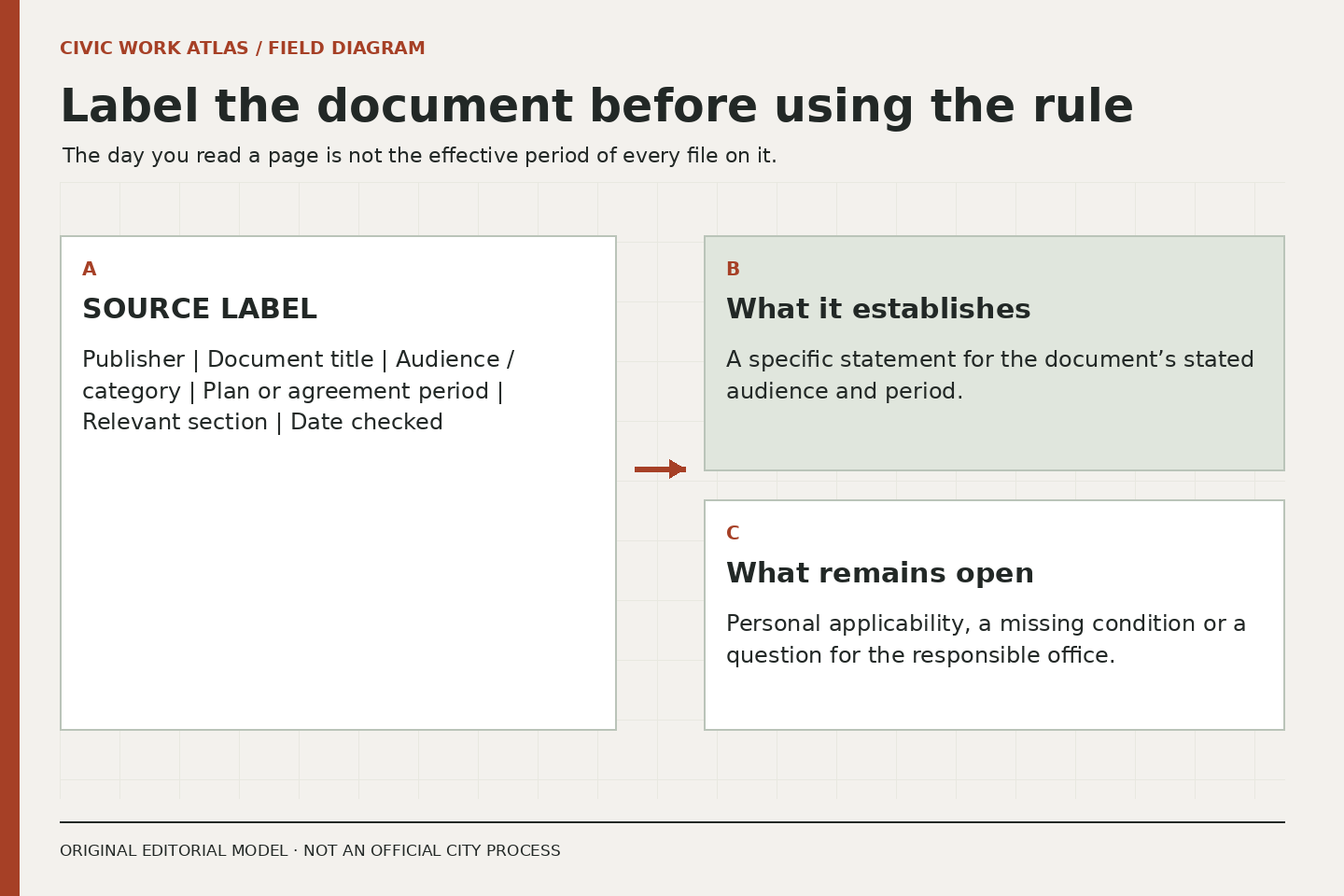
Make a source label before a summary
A useful label contains the publisher, document title, year, audience and section. Add the date you checked it and a note about any amendment or replacement reference. This is not bureaucratic decoration. It allows you to revisit the exact basis of a statement when a new guide appears or a link changes.
Use an original two-line summary: “This document says…” followed by “This does not yet establish…”. For example, a document may identify an enrollment topic without establishing that a particular event qualifies someone to change an election. The second line protects you from filling in a personal conclusion the source never supplied.
Preserve conditions that change the meaning
Words about eligibility, timing, enrollment, employee categories and exceptions are part of the substance. A short paraphrase that drops them may become inaccurate even if every remaining word is true. If you cannot summarize a provision without losing a condition, keep a reference to the section and ask the responsible office for clarification.
Do not use this publication to calculate entitlement, interpret a personal pension or decide a coverage question. Those decisions can have significant consequences and may require current official documents and qualified advice. Our contribution is a better reading record and a clearer question, not a substitute determination.
Compare documents without flattening them
Build separate rows for different years or audiences. Use matching columns such as topic, source section, conditions and unanswered question. Do not assume a blank field means no benefit exists; it may mean the document is a summary or the topic is covered elsewhere. Mark the reason for uncertainty whenever you can.
An upcoming-year guide can help someone prepare questions while a current-year guide answers a different research need. Neither needs to be discarded merely because another file is newer. The important distinction is relevance to the decision and period, not a contest over which PDF was uploaded last.
Finish with one answerable question
Before contacting an official office, reduce the uncertainty to a question that names the source and scope. “Which guide applies to this employee category and plan year?” is more actionable than “How do all benefits work?” If personal information becomes necessary, follow the verified official channel’s instructions rather than sending it to an editorial address.
Build a Reliable Picture of Public-Sector Compensation places benefits materials within the broader compensation document stack. Compare an Offer without Filling the Gaps Yourself explains how to preserve their conditions when reviewing an actual opportunity. A precise document label will make both tasks easier.
Related reading: Build a Reliable Picture of Public-Sector Compensation, Compare an Offer without Filling the Gaps Yourself, Choose the Right Public Resource for a Work Question.